
Smart Table Functions for Windows & Mac
Overview
Инструмент Totalizer — это лёгкая настольная утилита, разработанная для улучшения работы с таблицами в совместимых приложениях. Он позволяет пользователям выполнять типичные расчёты в стиле электронных таблиц непосредственно над данными таблицы, упрощая рабочие процессы как для профессионалов, так и для обычных пользователей. Плавно интегрируясь в табличные среды, он обеспечивает быстрый доступ к основным функциям, таким как сумма, среднее, минимум, максимум и подсчёт — идеальные инструменты для анализа данных, финансового учёта или подготовки отчётов.
Целевые пользователи включают создателей контента, специалистов по вводу данных, исследователей и всех, кто работает со структурированными данными в таблицах. Инструмент особенно полезен при работе с числовой информацией, где нужны быстрые итоги или статистические сводки без перехода к полноценному приложению для электронных таблиц. Его небольшой объём и простой интерфейс делают его доступным даже для нетехнических пользователей.
Разработан Джо Уолнсом, инструмент использует плагин контекстного меню jQuery для интуитивного взаимодействия. Последнее обновление (версия 0.90) теперь поддерживает запятые в качестве десятичных разделителей, расширяя удобство для международных пользователей. Хотя конкретные сценарии применения не описаны, функциональность подразумевает практические применения в академических, административных и бизнес‑средах, где обработка табличных данных является обычным делом.
Key Features & Capabilities
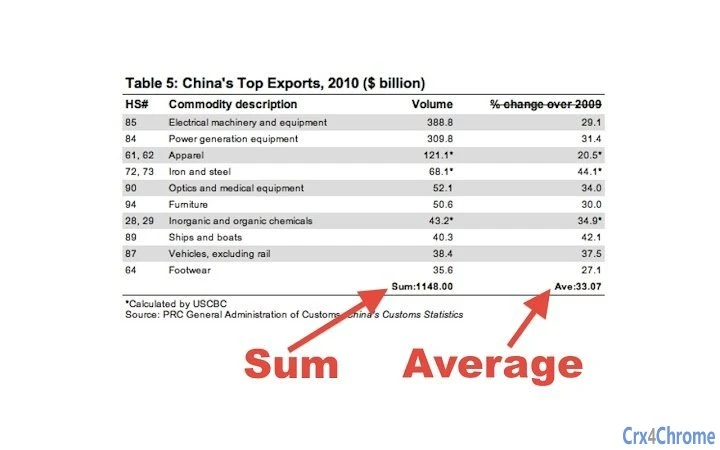
- Real-time Table Calculations – Click the 'Totalizer' icon to activate, then right-click any row or column to apply functions like Sum, Average, Min, Max, or Count.
- Flexible Exclusion Options – Use 'Exclude Cell' to omit specific entries from calculations, or 'Exclude All' to remove all values in the current row or column.
- Undo and Clear Functions – Both exclusion and function application can be undone; a 'Clear' option removes all applied functions from the table.
- Decimal Place Support – Now accepts both periods and commas as decimal separators, improving compatibility across global regions.
- Automatic Result Formatting – Results are displayed to two decimal places, ensuring consistent and readable output.
These features are particularly effective when working with numeric data. For example, a researcher analyzing survey results can instantly calculate averages across response columns. A financial assistant can sum monthly expenses in a table without copying data to Excel. The tool ignores non-numeric entries such as text, symbols, or invalid characters, ensuring only relevant data is processed.
Future enhancements include support for user-defined formulas (e.g., A1+B2), row/column labels, and export options to CSV or Google Docs. While these are not yet available, the current functionality already offers a practical solution for users seeking quick table analytics.
User Interface, Workflow & Performance
The interface is minimal and focused on usability. The 'Totalizer' icon in the toolbar serves as the primary activation point. Once enabled, the tool responds to right-click interactions on table rows or columns, presenting a context menu with available functions.
Navigating the tool requires no complex setup. Users simply click the icon, select a row or column, and choose a function. The workflow is streamlined, reducing the need for manual calculations or external tools. The visual feedback—such as the icon lighting up—provides clear confirmation of activation state.
Performance observations are based on general software behavior patterns. The tool operates within the host application environment, and its impact on system resources is expected to be low given its small size (2.4 MB). The developer did not specify resource usage details. Stability appears consistent with the incremental updates documented in the version history, which include bug fixes and logic improvements.
Users can expect smooth interaction during basic operations. However, exact performance under heavy workloads or with large tables was not specified. The tool’s reliance on the jQuery context menu plugin suggests a stable foundation, though real-world responsiveness may vary depending on the host application and system configuration.
Compatibility & System Requirements
Totalizer is compatible with Windows and Mac operating systems. The software version is 0.90, with a file size of 2.4 MB. It is designed to function as a desktop application, likely integrating with web or desktop environments where tables are present.
Exact system requirements were not listed. The developer did not provide additional system requirements. Compatibility information is limited to the supported platforms. Installation is straightforward, given the small file size and lack of complex dependencies.
Users should ensure their system meets standard desktop application requirements for running modern web-based or desktop environments. While no specific CPU or RAM thresholds were mentioned, the lightweight nature of the tool suggests it will run efficiently on most modern machines.
Pros and Cons
Pros
- Lightweight and fast, with a minimal 2.4 MB footprint
- Supports both period and comma decimal separators for global usability
- Intuitive right-click interface with clear visual feedback
- Offers essential spreadsheet functions without external software
- Free to use with no licensing restrictions
Cons
- Currently limited to basic functions; no support for custom formulas
- Does not support row or column labels
- Export functionality to CSV or Google Docs is not yet available
- Only works with numeric data; non-numeric entries are ignored
- Limited documentation on system requirements and integration specifics
FAQ Section
Is Totalizer compatible with Windows and Mac?
Yes, the tool is designed to work on both Windows and Mac operating systems.
Is the software secure to use?
As a lightweight desktop utility that operates within table environments, it does not require access to sensitive data. The source code is publicly available via GitHub, allowing transparency and verification.
How often are updates released?
Updates are released incrementally, with version history showing regular improvements. The latest version (0.90) includes enhanced decimal support and bug fixes.
Does the tool require an internet connection?
While the tool may function offline, it relies on the host application’s environment. No internet connection is required for core functionality.
Can I use Totalizer with my current table editor?
Compatibility depends on the host application’s support for external tools. The tool integrates with table environments where right-click context menus are available. Specific integration details are not provided.
Final Thoughts
Totalizer delivers a focused, efficient solution for users needing quick table calculations. Its ability to apply spreadsheet functions directly within tables—without switching tools—makes it a valuable addition to any productivity stack. The support for both period and comma decimal separators enhances its accessibility across regions.
While it lacks advanced features like formula creation or export options, the current capabilities are well-executed and practical. It is ideal for professionals who frequently work with numeric data in tables and want to avoid the overhead of full spreadsheet software.
With a free license, minimal system impact, and clear user intent, Totalizer stands out as a reliable utility. For those seeking a no-frills, fast, and secure way to enhance table productivity, this tool is a strong choice.
Download Totalizer Table Tool now







